What Is AI Concept Mapping? A Clear 2026 Guide
2026-07-10

AI concept mapping is defined as the automatic generation of structured, node-and-edge diagrams from unstructured text using technologies like Natural Language Processing and large language models. Unlike static outlines or basic mind maps, these diagrams show explicitly labeled relationships between concepts, such as "causes," "depends on," or "leads to." That distinction matters because labeled connections force deeper thinking than a simple hierarchy ever can. Whether you are studying for an exam, planning a project, or synthesizing research, understanding what AI concept mapping is gives you a real cognitive edge. This guide covers how the process works, what benefits it delivers, how to use the tools, and how to refine the output for maximum value.
How does AI concept mapping work?
AI concept mapping converts raw text into a visual knowledge graph through a four-stage automated pipeline. Each stage builds on the last, and understanding the sequence helps you prompt the AI more effectively.

Stage 1: Entity extraction
The AI reads your source material and identifies key concepts, terms, and named entities. A large language model parses sentence structure to pull out nouns, noun phrases, and domain-specific terms. This is the "skeleton extraction" phase: the AI rapidly produces the main themes and subtopics from dense material so you do not have to read every line before organizing your thoughts.
Stage 2: Relationship inference
The model then infers how extracted entities relate to each other. It assigns verb phrase labels to each connection, such as "regulates," "produces," or "is a type of." This step is what separates a true concept map from a taxonomy. A taxonomy only shows hierarchy. A concept map shows propositional knowledge, meaning it makes a claim about how two things interact.
Stage 3: Synonym merging and de-duplication
Duplicate concepts appear under different names in most source texts. The AI uses embedding-based semantic search and vector similarity to merge synonyms into single nodes. Without this step, a map about "machine learning" might also contain separate nodes for "ML" and "statistical learning," cluttering the diagram with redundant entries.
Stage 4: Layout optimization
The final stage arranges nodes spatially using force-directed algorithms. Related concepts cluster together visually. Cross-links, the connections that span different branches of the map, appear as arcs that reveal non-obvious relationships between topics. Force-directed layout is what makes the map readable rather than a tangled web of lines.
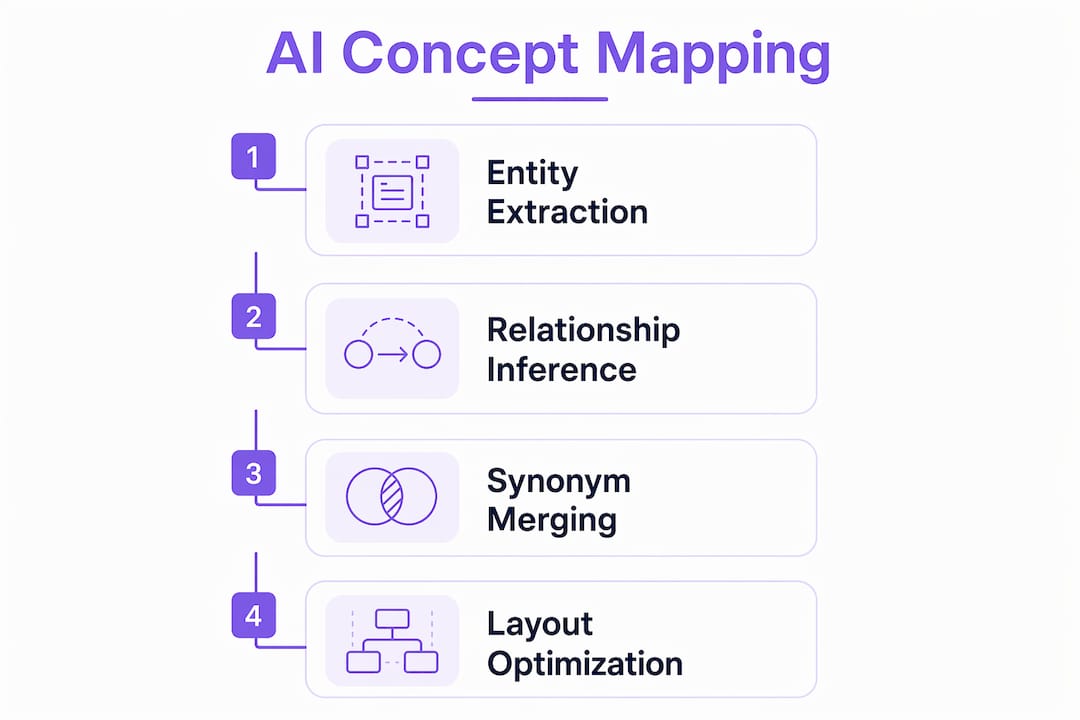
The full pipeline runs in under 60 seconds, converting what used to be hours of manual diagramming into an instant draft. That speed is the entry point. The real value comes from what you do with the draft next.
Pro Tip: *When prompting an AI to generate a concept map, explicitly request linking verb phrases and cross-links between branches. Without that instruction, most models default to a simple outline structure that lacks the relational depth that makes concept maps educationally powerful.*
What are the benefits of AI concept mapping for learners and project planners?
The core benefit of AI concept mapping is not speed. Speed is a side effect. The real benefit is that the process forces you to confront relationships between ideas, not just lists of them.
Explicitly labeled relationships between concepts drive a cognitive process called elaborative encoding. When you read a label like "photosynthesis produces glucose," your brain stores that fact with richer context than if you simply read "photosynthesis" and "glucose" as separate bullet points. That richer encoding improves both recall and transfer to new problems. Research consistently shows that students using concept maps outperform peers who rely on linear notes, precisely because of this relational structure.
For project planners, the benefit is different but equally concrete. A concept map of a project scope shows dependencies, risks, and decision points as a connected graph rather than a flat task list. You can see at a glance which nodes are central hubs and which are isolated leaves. That visibility changes how you prioritize.
Key benefits at a glance:
- Speed: Draft maps generate in under a minute, freeing time for analysis rather than transcription.
- Depth: Labeled relationships push you past surface-level understanding into analysis and synthesis, the upper tiers of Bloom's Taxonomy.
- Retention: Non-linear knowledge representations consistently outperform linear notes for conceptual learning and information synthesis.
- Flexibility: Maps work for exam prep, project scoping, literature reviews, and creative brainstorming equally well.
If you want to go deeper on applying AI to accelerate learning, the guide on how to use AI to learn a new subject fast covers complementary techniques worth pairing with concept mapping.
Pro Tip: *Generate the AI draft first, then close the source material and edit the map from memory. Gaps you cannot fill reveal exactly what you have not yet understood. This active editing step turns a passive AI output into a genuine study session.*
What are common AI concept mapping tools and how do you use them?
AI concept mapping tools vary widely in input types, pricing, and output formats. Most accept text, PDFs, and some accept video transcripts or URLs. Input versatility expands applicability across education and project management without requiring you to reformat your source material first.
A typical workflow looks like this:
- Upload or paste your source material into the tool.
- The AI generates a draft map with nodes, labeled edges, and a hierarchical layout.
- You review and edit: rename nodes, adjust connections, add cross-links the AI missed.
- Export the final map as SVG, PNG, or a graph format for use in presentations or study materials.
Common features across AI concept mapping tools include:
- Natural language prompting to guide map structure and depth
- Editable nodes and connection labels
- Export options including SVG, PNG, and JSON graph formats
- Integration with document platforms and learning management systems
- Tiered pricing models, with free tiers typically capping at three maps and subscriptions unlocking additional features
The table below compares feature categories across tool tiers to help you choose the right fit.
| Feature category | Free tier | Paid tier |
|---|---|---|
| Map generation limit | Typically 3 maps | Unlimited |
| Input types | Text and basic paste | PDFs, URLs, video transcripts |
| Export formats | PNG only | SVG, PNG, JSON, graph formats |
| Editing capabilities | Basic node renaming | Full edge editing and cross-link tools |
| Integrations | None | Document platforms, LMS, Notion |
If you are new to using AI tools without a technical background, the article on using AI without technical skills walks through the setup process in plain language.
How to refine and apply AI-generated concept maps effectively
AI-generated maps are first drafts, not finished products. Treating them as drafts requiring active user editing is the single most important habit to develop. The editing process is where the learning actually happens.
Follow this refinement sequence:
- Review all node labels. Rename any label that is vague or uses the AI's phrasing rather than your own understanding.
- Check every relationship label. Replace generic labels like "related to" with specific verb phrases that make a real claim.
- Add cross-links. Identify concepts in different branches that connect. Draw those links and label them. This is where most AI maps fall short without user intervention.
- Promote buried details. If a subtopic turns out to be central to your understanding, move it closer to the map's core.
- Merge maps across chapters. Merging chapter-level maps into a unit-level composite reveals bridging concepts that connect otherwise isolated clusters. Those bridging nodes are often the most testable ideas in an exam or the most critical decisions in a project.
- Test yourself with a blank version. Export a version with node labels hidden and try to reconstruct the map from memory.
Common pitfalls to avoid:
- Accepting the AI's relationship labels without reading them critically
- Building maps that are taxonomies only, with no cross-links between branches
- Skipping the merge step when working across multiple chapters or documents
A blank map used for self-testing or group discussion is one of the most underused applications of this workflow. It converts a visual artifact into an active recall exercise.
Pro Tip: *After merging two or more chapter maps, look specifically for nodes that appear in both. Those repeated concepts are your bridging nodes. They are the ideas that unify the topic and almost always appear on exams or in project decision points.*
For learners who want a broader AI-assisted study system, the guide on AI homework assistance explained for students and parents covers how concept mapping fits into a larger workflow.
Key Takeaways
AI concept mapping delivers its greatest value when users treat AI output as a structured draft and invest active effort in editing, labeling, and merging maps into unified knowledge frameworks.
| Point | Details |
|---|---|
| Definition is precise | AI concept mapping uses NLP and large language models to generate node-and-edge diagrams with labeled relationships, not just hierarchies. |
| Speed is the entry point | Draft maps generate in under 60 seconds, but the real learning comes from the editing process that follows. |
| Labeled relationships drive retention | Explicit verb phrase labels between nodes produce elaborative encoding, which outperforms linear note-taking for recall and transfer. |
| Map merging builds synthesis | Combining chapter-level maps into composite frameworks reveals bridging concepts critical for exams and project decisions. |
| Blank maps enable active recall | Exporting a label-hidden version of your map creates a self-testing tool that reinforces memory more effectively than re-reading. |
Why I think most people use AI concept maps wrong
I have spent a significant amount of time testing AI-generated concept maps across different subjects and project types. The pattern I keep seeing is the same: people generate a map, look at it for two minutes, and move on. They treat it like a summary they have already read. That is the wrong mental model entirely.
The map is not the output. The map is the prompt for your own thinking. Every time I have forced myself to edit a generated map, rename its labels in my own words, and draw cross-links the AI missed, I have walked away understanding the topic at a different level than I did before. The AI's most valuable contribution is what I think of as skeleton extraction. It gives you the rough architecture of a topic fast. Your job is to put the muscle on the bones.
The other mistake I see constantly is ignoring relationship labels. People accept "related to" as a valid edge label and move on. That label says nothing. "Causes," "contradicts," "enables," and "is measured by" each tell you something specific. Forcing yourself to write a real label is the moment the concept actually sticks.
My recommendation: treat every AI concept map as a hypothesis about how a topic is structured. Your editing session is the experiment that tests whether that hypothesis holds up against what you actually know.
> *— Iosif Peterfi*
Clawbase and AI-powered learning workflows
Clawbase provides managed hosting for OpenClaw, a powerful open-source AI assistant, with one-click deployment and no server maintenance required. For learners and project planners who want a private, always-on AI agent to support their workflows, including concept map generation, document analysis, and study automation, Clawbase removes the technical setup entirely.

With access to over 50 AI models and 99.9% uptime, Clawbase gives you a persistent AI environment that works across Telegram, Discord, and your own files. You can explore the full range of AI agent use cases to see how concept mapping fits into a broader learning and productivity system. If you are ready to run your own AI assistant without writing a single line of code, Clawbase managed hosting starts at $16 per month.
FAQ
What is the AI concept mapping definition?
AI concept mapping is the automated generation of node-and-edge diagrams from unstructured text using Natural Language Processing and large language models, with labeled relationships between each concept node.
How does AI concept mapping differ from a mind map?
Mind maps use a central topic with radiating branches but rarely label the connections. AI concept maps include explicit verb phrase labels on every edge and cross-links between branches, making them propositional knowledge structures rather than simple hierarchies.
Are AI-generated concept maps accurate enough to use directly?
AI-generated maps are accurate starting drafts but require user editing to rename vague labels, add cross-links, and correct relationship inferences. Skipping that editing step significantly reduces their educational value.
What subjects or tasks benefit most from AI concept mapping?
Any subject with dense relational content benefits most, including biology, law, history, and systems design. Project planning also benefits because concept maps make dependencies and decision points visible in a way that task lists cannot.
Do I need technical skills to use AI concept mapping tools?
Most AI concept mapping tools require no coding or technical setup. You paste or upload your source material, and the tool generates the map automatically through a natural language interface.