99.9% Uptime for Headless Browser AI: OpenClaw + Relay for Small Teams
2026-09-10

"Headless browser AI," in the sense that matters for a working assistant, is a hosted OpenClaw agent paired with browser-relay integration, letting it read and act on pages inside your real, logged-in browser session. For most developers, non-technical users, and small teams, managed hosting like Clawbase is the practical route. This guide covers the architecture, the setup, the security tradeoffs, and where it actually earns its keep.
***
> TL;DR:
>
> - Managed hosting is more cost-effective for small teams with moderate request volumes because it reduces maintenance time and infrastructure management.
> - Remote relay mode introduces security risks by enabling cross-device control, so it should be used cautiously and only when necessary.
> - Setting up a managed OpenClaw instance is straightforward with a single-click deployment, but regular checks on connection stability, backups, and updates are recommended.
> - The agent can access and automate tasks within logged-in browser sessions, such as extracting reports, filling forms, or managing emails behind authentication walls.
> - Troubleshooting common issues requires verifying node, relay, and attachment statuses, with community support emphasizing the importance of session logs for debugging.
***
Table of Contents
- What Is a Browser-Enabled OpenClaw Agent?
- How Does Browser Relay Let an Agent Use Your Real Session?
- Managed Hosting or Self-Hosting: Which Actually Makes Sense?
- How Do You Set Up a Managed OpenClaw Instance With Browser Relay?
- What Security and Privacy Boundaries Should You Set?
- What Can a Browser-Enabled Agent Actually Do for You?
- What Do You Check When Something Breaks?
- Why We Keep Coming Back to Managed Hosting for This
- Get a Browser-Enabled OpenClaw Agent Running Today
- Sources
What Is a Browser-Enabled OpenClaw Agent?
A browser-enabled OpenClaw agent is different from the general-purpose headless browsers developers reach for in automated browser testing or scraping pipelines. Those tools, the kind used for scripted end-to-end tests, spin up a fresh, disposable browser instance with no login state and no memory of yesterday's session. An OpenClaw agent with browser-relay does the opposite: it operates inside a browser you're already signed into, using your actual cookies and session tokens without ever touching them directly.
That distinction is the entire point. The OpenClaw Gateway acts as the local control plane, coordinating models, tools, and channel connections, and browser-relay slots into that model as one more attachable tool. The stack has a few moving parts:
- Gateway — the control plane that routes requests between your agent, its tools, and connected channels
- Node — the running instance of OpenClaw, whether self-hosted or managed
- Browser-relay bridge — the local service that lets the agent talk to your browser
- Chrome extension — the piece you install and explicitly enable per tab
- Model provider — whichever AI model handles reasoning for the task at hand
Individuals managing personal inboxes, non-technical staff who just want status updates without touching a terminal, and small teams needing authenticated access to internal tools are the people this setup actually serves.
How Does Browser Relay Let an Agent Use Your Real Session?
Browser-relay works through a local loopback relay running on 127.0.0.1, paired with a Chrome extension you attach to a specific tab. The reliefeai/browser-relay project documents this pattern precisely: the relay never sees your credentials, because the agent operates through your already-authenticated browser rather than logging in independently.
The flow breaks down into a few steps:
- You install the extension and start the local relay service.
- You attach the extension to a specific browser tab, generating a tab-id.
- The agent calls the relay through a CLI or HTTP API, passing that tab-id with each request.
- The relay returns DOM content, screenshots, text, or link data from that tab, or executes an action like filling a form.
The governing rule, laid out clearly by Agent Browser Relay, is simple: no attached tab, no read. Nearly every browser-relay implementation documents this same attach-then-read contract as the baseline safety guarantee, since the agent physically cannot see a tab you haven't explicitly connected.
Remote relay mode extends this further using a remote-device-id, letting an agent reach a browser session on a different machine. That capability is powerful and it's also the one place this architecture asks for the most caution, since it opens a network path between devices instead of keeping everything on loopback.
Managed Hosting or Self-Hosting: Which Actually Makes Sense?
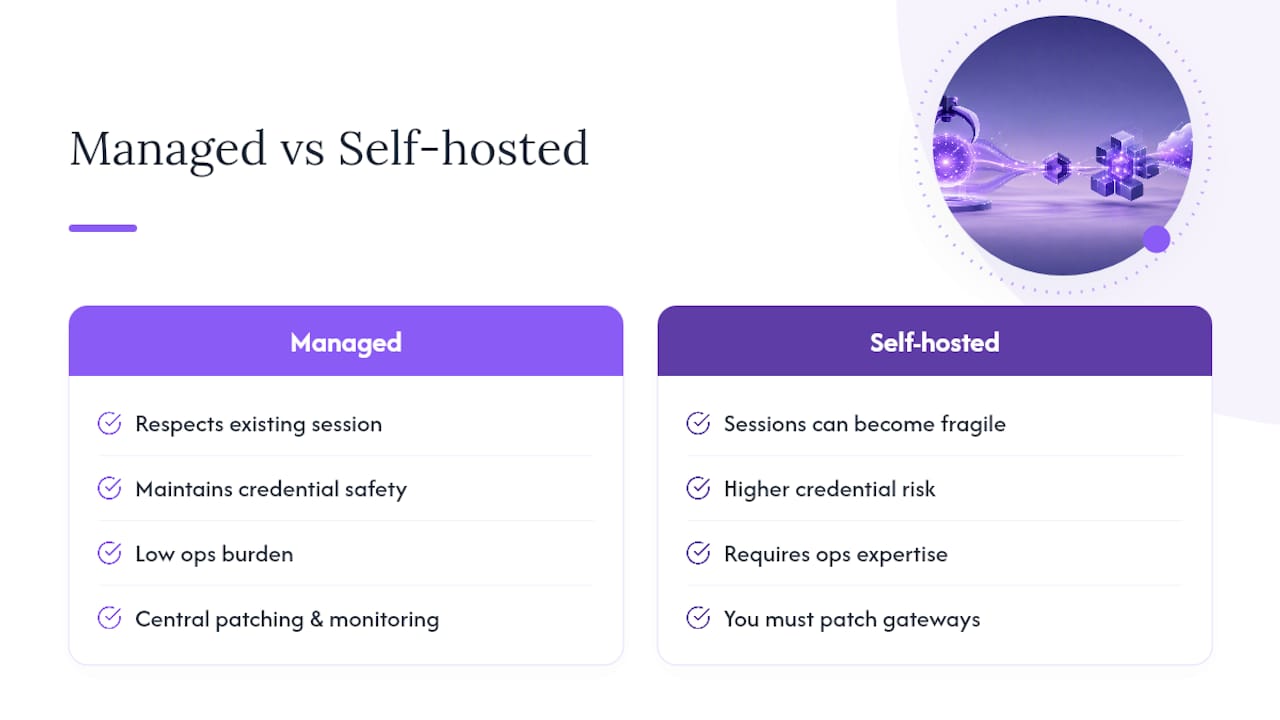
Self-hosting OpenClaw means owning every operational task yourself: patching the Gateway, monitoring uptime, rotating credentials, managing backups, and debugging relay connectivity issues at 11 PM when a tab attachment silently drops. None of that is exotic engineering, but it adds up to real weekly maintenance time that most small teams underestimate going in.
For teams under moderate daily request volumes, managed hosting tends to be more cost-effective once you account for engineering hours rather than just the server bill. Volume and compliance requirements are the real deciding factors, not sticker price.
- Managed hosting fits: individuals, non-technical users, and small teams running typical daily workloads without dedicated infrastructure staff.
- Self-hosting or a hybrid setup fits better when: you face strict data-residency or compliance mandates, run very high request volumes, or need a research environment where you're actively modifying the agent's core behavior.
Pro Tip: *Before committing either way, run your actual weekly task volume through both cost models for a month. Most teams overestimate their traffic and underestimate their own patching time.*
A hybrid pattern, local orchestration paired with managed inference, has become common precisely because it lets teams keep control over sensitive data flow while still offloading the infrastructure grind.
How Do You Set Up a Managed OpenClaw Instance With Browser Relay?
Getting a browser-enabled agent running doesn't require sysadmin skills when you're using a one-click managed deploy. Here's the practical sequence:
- Deploy your OpenClaw instance on a managed dedicated server and confirm the Gateway comes online.
- Pair a node from your account dashboard and verify it shows a connected status.
- Install the browser-relay Chrome extension and enable it.
- Attach the extension to the tab you want the agent to work with.
- Copy the resulting tab-id and confirm the relay reports an active connection.
- Run a simple test task, something like "summarize this open tab," to confirm end-to-end function.
A few things worth checking once it's running:
- Confirm persistent memory is retaining context between sessions, not just within a single conversation.
- Verify daily encrypted backups are actually scheduled, not just enabled by default.
- Check that automated updates are applying without breaking your relay connection.
Community documentation from browser-relay's SKILL guide recommends the CLI for everyday interactive work and reserves the HTTP API for scripted integrations, which keeps your day-to-day usage simpler while leaving room for automation later. For a deeper walkthrough of the extension setup, Clawbase's browser-relay guide covers the attach workflow step by step.
What Security and Privacy Boundaries Should You Set?
Credentials never leave your machine in this model. Because the agent works through your already-logged-in browser session rather than authenticating on its own, there's no password or token handed to the relay, the extension, or the underlying model provider. The attach rule does the heavy lifting here: an unattached tab is invisible to the agent, full stop.
A short hardening checklist worth actually following:
- Disable remote relay mode unless you specifically need cross-device control.
- Rotate any API tokens tied to your OpenClaw Gateway on a regular schedule.
- Use a private relay rather than a public one if your work touches sensitive internal tools.
- Confirm encrypted backups are running, since agent memory can accumulate sensitive context over time.
- Review session logs periodically to catch unexpected attach events.
Pro Tip: *Treat "which tabs are currently attached" as a question you check weekly, the same way you'd check which apps have access to your email.*
Community guides on Agent Browser Relay also caution against ad-hoc automation scripts that bypass the relay pattern entirely, since they tend to disrupt your real session rather than preserve it.
What Can a Browser-Enabled Agent Actually Do for You?
The value shows up the moment an agent needs access to something behind a login wall. Generic automated browser testing tools can't touch your intranet dashboard or your personal inbox. A relay-attached agent can.
Common use cases in practice:
- Drafting replies to routine emails after reading your inbox on an attached tab.
- Checking a status page or uptime dashboard and reporting back only when something changes.
- Filling out repetitive web forms that don't have an API.
- Pulling context from a pull request or internal dev dashboard to flag issues before standup.
- Extracting a report from an internal tool that has no export button.
Channel integrations make these genuinely usable day to day. Connecting the agent to Telegram, Discord, or Slack means a status check or drafted reply lands where you're already working, instead of requiring you to open yet another dashboard to see what the agent found.
What Do You Check When Something Breaks?
Most browser-relay issues trace back to one of three things: the node losing connection, the relay reporting an inactive tab, or a port/token mismatch after a restart. Work through it in this order:
- Check node status first, confirming the Gateway shows your instance as connected.
- Check relay status to see if the local loopback service is actually running.
- Reattach the extension to the tab if the attach state shows stale or disconnected.
- Compare the port and token your CLI is using against what the relay currently expects.
A managed provider handles patching, uptime monitoring, and infrastructure failures behind a 99.9% uptime guarantee, but the logic you built into your agent, what it does with a page once it reads it, stays yours to debug. When the fix isn't obvious after a reattach, pull the session logs before escalating to support; it usually shows exactly where the chain broke.
Why We Keep Coming Back to Managed Hosting for This
Browser-relay is elegant precisely because it respects your existing session instead of replacing it, and that's exactly the kind of architecture that gets fragile fast when nobody's watching the infrastructure underneath it. Patching a Gateway at midnight isn't a skill most non-technical users want to build. That's the case for managed hosting here, not convenience for its own sake, but keeping the credential-safety model intact without asking you to become an ops engineer.
For more on the setup mechanics, Clawbase's blog covers ongoing tutorials as the relay ecosystem evolves.
> *— Iosif Peterfi*
Get a Browser-Enabled OpenClaw Agent Running Today
Clawbase removes the exact friction this guide just walked through: no patching a Gateway yourself, no debugging a dropped relay connection at midnight, no learning sysadmin work just to keep an agent online. You get one-click deployment on a dedicated encrypted server, browser-relay support built in, persistent memory that survives restarts, and a 99.9% uptime guarantee backing the whole thing.

Plans start with an entry tier that offers a free trial period, allowing you to pair a node, attach a tab, and run your first real task before committing to anything. If your team is weighing agencies or manual workflows against something that just runs in the background, that free trial is the fastest way to find out if a browser-enabled agent actually saves you time. Head to Clawbase to start your trial and get your first instance connected today.