Avoid Reindexing Thousands: AI Document Tagging for Developers
2026-09-13

AI document tagging is the automated process of assigning labels, categories, or metadata to files using machine learning or language models, so systems can search, route, and act on documents without a human reading each one. It's worth adopting once you're past a few hundred documents a month or need consistent labels that a rotating cast of humans can't reliably produce. Below the surface, it's really an indexing problem dressed up as a classification problem.
***
> TL;DR:
>
> - Teams should prioritize multi-label classification and field extraction when documents often span multiple categories or require detailed metadata for automation.
> - Validating schema and success metrics before training, and including human review at confidence thresholds, are critical to prevent reindexing disasters and ensure accuracy.
> - Zero-shot LLM tagging suits evolving or fuzzy categories without extensive labeled data, but combining it with rule-based methods improves precision on structured fields.
> - Ongoing monitoring of tag distribution, confidence scores, and human correction rates helps detect schema drift and maintain tagging accuracy over time.
> - Using hosted private agents simplifies deployment, preserves data security, and enables workflows like email triage or invoice extraction without managing infrastructure.
***
Table of Contents
- How AI Document Tagging Actually Works
- Choosing a Tagging Schema: Single-Label, Multi-Label, and Field Extraction
- Building a Tagging Pipeline: The Implementation Checklist
- LLMs vs. Classifiers: Picking the Right Model for the Job
- Turning Tags Into Search, Routing, and Automation
- Keeping Tags Accurate: Drift, Feedback, and Governance
- Where to Learn the Mechanics Firsthand
- Where AI Tagging Breaks Down
- Comparing Approaches to AI Document Tagging
- Security and Privacy in AI Tagging Pipelines
- Measuring Whether Your Tagging System Actually Works
- Build vs. Buy: When a Managed Agent Makes More Sense
- Skip the Setup: Run Tagging Workflows on a Private Agent
- Sources
- FAQ
How AI Document Tagging Actually Works
Every tagging pipeline, whether it's a homegrown classifier or a vendor platform, breaks the problem into the same handful of stages. Understanding them matters more than picking a tool, because the tool choice only makes sense once you know which stage is your bottleneck.
For scanned files or PDFs, the pipeline starts with OCR and layout parsing. This step turns pixels into structured text, preserving the relationship between headers, tables, and body copy so a classifier isn't just handed a wall of text with no context. Once text is extracted, the system pulls features from it: tokens, n-grams, or increasingly, dense vector embeddings that capture semantic meaning rather than exact word matches.
From there you choose a classification strategy. Text classification assigns predetermined categories to a document, and you can do this with a supervised model trained on your own labeled examples, or with an LLM doing zero-shot or few-shot reasoning against a prompt that describes your categories. Both approaches feed the same downstream step: storing the resulting tags as metadata attached to the document record.
That's where embeddings and vector indexes come in. Tags alone give you exact-match filtering. Pair them with a vector index and you get semantic retrieval, where a search for "termination clause" also surfaces documents tagged "employment agreement" even without that exact phrase.
- OCR/layout parsing converts scanned or image-based files into structured, machine-readable text
- Feature extraction turns raw text into tokens or embeddings a model can reason over
- Classification assigns tags, either through a trained model or an LLM prompt
- Embeddings and vector indexes let tag-based filters and semantic search work together
Choosing a Tagging Schema: Single-Label, Multi-Label, and Field Extraction
The schema decision shapes everything downstream, and it's the one most teams rush. Get it wrong and you'll be reindexing thousands of documents six months in.
- Single-label vs. multi-label. If every document belongs to exactly one bucket (invoice, contract, resume), use single-label classification. If documents commonly span categories, like a contract that's also a vendor agreement and an NDA, you need multi-label, which produces independent confidence scores per tag rather than one winner-take-all result, as spaCy's text classification components illustrate.
- Document-level tags vs. field extraction. Tagging a whole document as "invoice" is different from extracting the invoice number, due date, and vendor name as key-value pairs. Most real pipelines need both: a coarse tag for routing, and fine-grained field extraction for downstream automation.
- Seeded taxonomies vs. discovery mode. A seeded taxonomy uses categories you define up front; discovery mode lets the model surface themes and entities on its own, which is useful when you don't yet know what's in your document backlog.
A legal team might tag by document type and jurisdiction. A finance team might tag by expense category and cost center. The schema should mirror how your team already searches, not an abstract ideal.
Building a Tagging Pipeline: The Implementation Checklist
Most tagging projects fail not because the model is bad, but because the schema was never validated against real documents before training started. Here's the sequence that avoids that trap.
- Define the schema and success metrics. Decide your tag categories, whether you need single or multi-label, and set concrete precision and recall targets before writing any code. Microsoft's custom text classification workflow frames this as a defined life cycle: schema, label, train, evaluate, deploy, classify, and it's a sequence worth following in order rather than skipping ahead to training.
- Label your data deliberately. Sample across document types you'll actually see in production, write annotation guidelines that resolve ambiguous cases in advance, and run quality checks with a second annotator on a subset. Microsoft's tagging interface for document processing models shows this concretely: you draw regions on a form and map them to field names, which is tedious but it's what teaches the model to extract structured data instead of guessing.
- Choose your model approach. A supervised fine-tune works well with a stable taxonomy and enough labeled examples. An LLM prompt pipeline works better when your categories are semantic and fuzzy, or when you don't have thousands of labels yet.
- Evaluate against a held-out validation set. Set confidence thresholds below which a document routes to human review instead of auto-tagging. Google's Document AI platform supports this kind of custom extractor and classifier tuning, including few-shot improvements when your labeled set is small.
- Deploy with monitoring and a rollback plan. Push through an API with batching for volume, log every tag decision with its confidence score, and build a re-tagging process for when you update the schema later.
Pro Tip: *Run your evaluation set through the pipeline before you touch production data, and check the confusion matrix by category, not just the aggregate accuracy. A model can hit 92% overall accuracy while completely failing on your rarest, highest-stakes tag.*
LLMs vs. Classifiers: Picking the Right Model for the Job
The trade-off comes down to three variables: cost, latency, and accuracy, and they pull against each other. API-based LLMs are fast to deploy and need almost no labeled data, but per-document cost adds up at scale and latency can be a problem for real-time tagging. Fine-tuned classifiers cost less per call and run faster once trained, but they need a real labeled dataset and retraining cycles when your taxonomy shifts. On-prem or self-hosted classifiers add infrastructure overhead in exchange for data control.
Zero-shot or few-shot LLM tagging tends to win when your categories are semantic and fuzzy, like "customer sentiment" or "urgency level," and you don't have thousands of labeled examples sitting around. This is where zero-shot classification with LLMs genuinely earns its reputation for fast deployment.
- Prompt for structured JSON output with fixed keys, never free text you'll have to parse later
- Include explicit tie-breaking rules for documents that plausibly fit two categories
- Ask the model to return a confidence score alongside each tag, not just the label
The Haystack tutorial on LLM-based tagging demonstrates exactly this pattern: prompt the model, get back structured metadata, store it in the document index.
Pro Tip: *Combine LLM semantic tagging with deterministic rules, like regex for invoice numbers or dates, for the fields where precision actually matters. Let the LLM handle judgment calls and let pattern matching handle anything with a fixed format.*
Turning Tags Into Search, Routing, and Automation
Tags only earn their keep once something downstream actually uses them. Treat tagging as the indexing step that makes documents both findable and actionable, not a labeling exercise you do and forget.
In a search pipeline, tags function as filters layered on top of semantic retrieval, letting a user narrow "contracts" before a vector search ranks by relevance within that subset. In an automation pipeline, tags trigger routing logic: a document tagged "invoice, high value" might route to a manager for approval, while one tagged "contains PII" gets flagged for redaction before anyone else touches it.
- Tags act as hard filters, while embeddings handle fuzzy semantic matching within that filtered set
- Routing rules keyed to tags automate ticket triage, approval chains, and compliance flags
- Explicit metadata tags are cheap to query; embedding-based augmentation costs more but catches documents that slip past keyword tags
- Batch tagging suits nightly backlogs; streaming tagging suits inboxes and live document intake, where latency matters more than throughput
The operational question is almost always re-indexing cadence. If your taxonomy changes quarterly, batch re-tagging on that schedule is fine. If it changes weekly, you need an incremental pipeline that only reprocesses what's new.
Keeping Tags Accurate: Drift, Feedback, and Governance
A tagging system that worked great at launch degrades quietly. Document types shift, business categories get renamed, and nobody notices until search results start feeling wrong. Practitioners in document automation flag this as one of the most consistent failure modes: taxonomies drift because business needs change, and a static model doesn't know that.
- Monitor tag-distribution changes over time; a sudden spike in one category often signals a new document type your schema doesn't cover yet
- Track confidence-score trends, not just accuracy, since a slow decline in average confidence usually precedes a visible accuracy drop
- Build a feedback loop where human corrections get logged and folded into periodic retraining
- Set governance rules for taxonomy changes: naming conventions, versioning, and who has permission to add or retire a tag
- Route PII and compliance-sensitive tags through mandatory human review regardless of confidence score
One underrated benefit of AI tagging, when it's governed well, is consistency. AWS's research on tagging and cost optimization points out that automated tagging holds to the same rule every time, where human teams naturally drift toward inconsistent judgment calls as different people apply their own interpretation of a category.
Pro Tip: *Set a monthly review of your ten lowest-confidence tags, not your highest-volume ones. That's where drift shows up first, long before it hits your averages.*
Where to Learn the Mechanics Firsthand
Reading about tagging only gets you so far. Building a small pipeline against real docs is what makes the concepts click.
- Microsoft Learn's tagging guide walks through manual field and table tagging for document processing models
- The Haystack LLM tagging tutorial shows a working example of prompt-based metadata extraction
- Google's Document AI documents custom extractors you can train on small samples
- Clawbase's guide on AI document management workflow examples shows tagging feeding directly into agent-driven retrieval
- Start small: email triage or invoice field extraction make good pilot projects because the tag set is narrow and the payoff is immediate
Where AI Tagging Breaks Down
No tagging system is free of friction, and pretending otherwise sets teams up for a rough production launch. The most common failure isn't a bad model, it's an ambiguous schema that even a human annotator would argue about.
Documents that genuinely span categories cause the most consistent headaches. A vendor contract that's also an NDA and a statement of work will confuse a single-label classifier no matter how well it's trained, which is exactly why the multi-label decision from earlier matters so much upfront.
Class imbalance is another persistent problem.
LLM-based tagging introduces its own quirks: inconsistent output formatting if your prompt isn't strict about JSON structure, occasional hallucinated tags outside your defined schema, and cost that scales linearly with document volume in a way fine-tuned classifiers don't. Scanned documents with poor image quality also degrade OCR accuracy before classification even starts, so garbage input produces garbage tags regardless of how good the downstream model is.
And then there's the maintenance burden nobody budgets for. A tagging system isn't a one-time build, it's an ongoing commitment to relabeling, retraining, and taxonomy upkeep as your document mix evolves.
Comparing Approaches to AI Document Tagging
There's no single best platform, there's a best fit for your data volume, technical resources, and how fixed your taxonomy is.
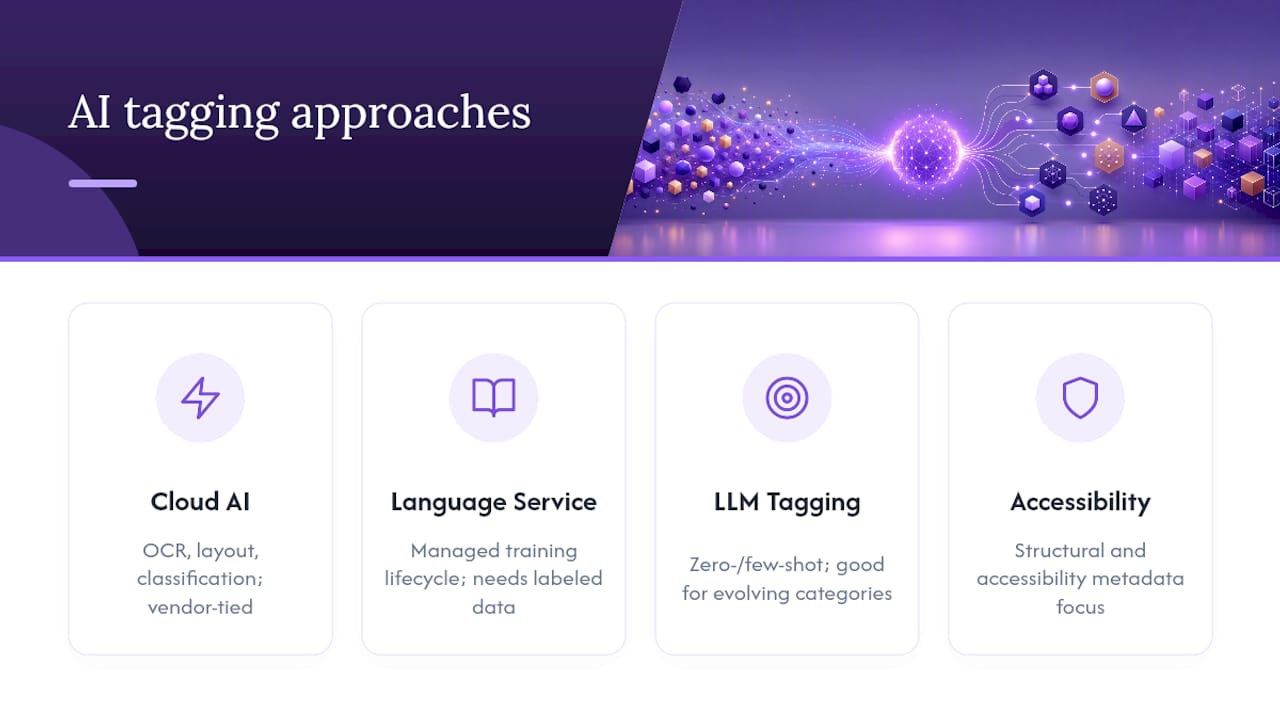
Cloud AI platforms with custom extractors and classifiers, like Google's Document AI, work well when you need out-of-the-box field extraction plus the option to fine-tune on your own document types. These platforms handle OCR, layout parsing, and classification in one pipeline, which cuts integration work but ties you to that vendor's infrastructure.
Language-service classification tools, such as Microsoft's custom text classification service, are built around a defined training life cycle and suit teams that already have labeled data and want a managed training and evaluation workflow rather than building one from scratch.
LLM-based tagging frameworks, like the approach demonstrated in Haystack's tutorials, suit teams with fuzzy or evolving categories and little labeled data, since zero-shot and few-shot prompting skips the labeling bottleneck entirely.
Open, accessibility-focused tagging pipelines, like the AI-based PDF auto-tagging approaches documented by the PDF Association, focus on structural and accessibility metadata rather than business categorization, which matters if your documents need to meet accessibility standards on top of searchability.
The practical takeaway: teams with a stable, well-defined taxonomy and real labeled data should lean toward fine-tuned classifiers. Teams still figuring out their categories, or working with genuinely diverse document types, get more mileage from LLM-based approaches early on, then layer in deterministic rules as patterns stabilize.
Security and Privacy in AI Tagging Pipelines
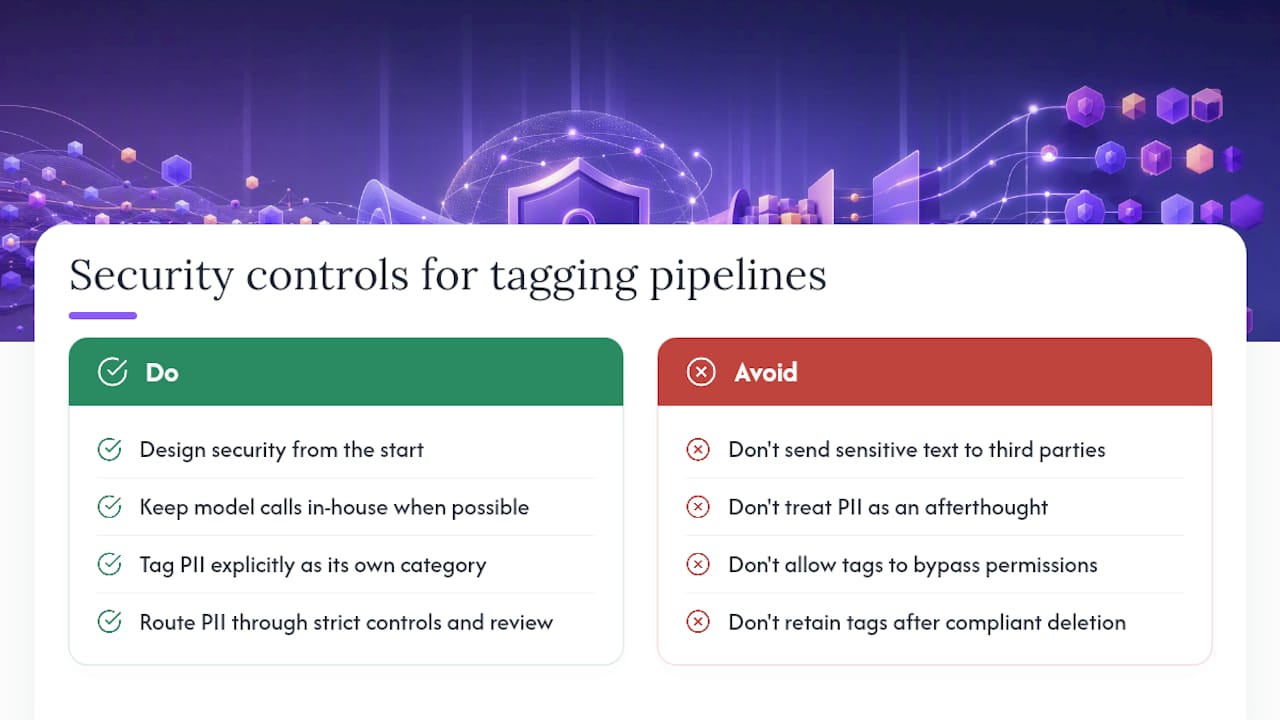
Document tagging touches sensitive content by definition, since the whole point is reading and categorizing files that often contain contracts, financial records, or personal data. That makes security a design requirement, not an afterthought bolted on before launch.
The biggest exposure point is usually the model call itself. If you're sending document content to a third-party API for classification, you're transmitting potentially sensitive text outside your infrastructure, which raises real questions for regulated industries like healthcare, legal, and finance. Self-hosted or on-prem classifiers avoid that exposure but shift the security burden onto your own infrastructure and patching discipline.
PII detection deserves its own tagging category, not an afterthought bundled into general classification. Tag documents containing personal data explicitly, and route anything flagged that way through stricter access controls and mandatory human review before it moves further down the pipeline, regardless of how confident the model is in its own output.
Access control on the tags themselves matters just as much as on the documents. A tag like "confidential" or "legal hold" needs the same permission boundaries as the underlying file, otherwise you've built a search index that quietly bypasses the access restrictions your document store already enforces. Retention policy should extend to tags and metadata too. If a document gets deleted for compliance reasons, its tags and any cached embeddings need to go with it.
Measuring Whether Your Tagging System Actually Works
Standard classification metrics apply here, but document tagging has a few wrinkles worth knowing before you build your evaluation set.
Precision and recall per tag, not just in aggregate, tell you where the model actually struggles. A system with 90% overall accuracy can still be nearly unusable on your rarest, highest-stakes category, and averaging across tags hides exactly that.
Confidence calibration matters as much as raw accuracy. spaCy's text classification components output confidence scores per label, and the useful question isn't just "was the tag right," it's "did the confidence score reliably predict when the model was wrong." A well-calibrated model that says "60% confident" should be wrong close to 40% of the time; if it's wrong 80% of the time at that confidence level, your thresholds need recalibrating.
Human-review agreement rate is the metric most teams skip and shouldn't. Track how often a human reviewer overturns an auto-assigned tag, broken out by category and confidence band, not just as a single aggregate number.
For multi-label systems, evaluate exact-match accuracy (did the model get every tag right) separately from partial-match accuracy (did it get most of them), since these tell very different stories about production readiness.
Benchmark against a fixed validation set every time you retrain, and track metrics over time rather than treating each evaluation as a one-off. A model that scores well today and drifts three months from now is a governance failure, not a modeling one.
Build vs. Buy: When a Managed Agent Makes More Sense
Building your own tagging pipeline is worth it when you need tight control over data handling, or your integration needs are unusual enough that no platform fits cleanly. For most teams, though, a hosted private agent gets you to a working pilot faster, without the ops overhead of managing training infrastructure yourself. Start small: define your metrics, run a narrow pilot, then iterate.
> *— Iosif Peterfi*
Skip the Setup: Run Tagging Workflows on a Private Agent
A hosted OpenClaw agent can run document tagging workflows without requiring you to manage a training pipeline, OCR stack, or server maintenance — see how the AI Document Analyzer by AmmarAI streamlines chat-driven document processing for your workflows. That's the real contrast with building in-house: no infrastructure to patch, no model retraining cycle to own, just a private agent that connects to your files and communication tools out of the box.

Deployments can run on dedicated, encrypted servers with persistent memory, allowing an agent to maintain document context and tagging history across sessions. Access to numerous AI models with multi-model routing can enable routing semantic categorization to one model while handling structured field extraction with another in the same workflow. Connections to popular messaging platforms can allow the agent to flag low-confidence tags or PII hits directly within tools teams commonly use.
If you're weighing a pilot like email triage or invoice extraction, browse the OpenClaw use-case gallery for concrete examples, then start a trial on the ClawBase hosting plans to see how quickly a private agent gets a tagging workflow running end to end.
Sources
- What is Text Classification? - AWS
- Tag documents in a document processing model | Microsoft Learn
- Document AI | Google Cloud
FAQ
What Is AI Tagging?
AI tagging is the automated process of using machine learning or language models to assign labels, categories, or metadata to content, so it becomes searchable, filterable, and usable by downstream automation without manual review of every item.
What Is Document Tagging?
Document tagging specifically applies that process to files, assigning categories, key-value fields, or descriptive metadata to documents so they can be indexed, routed, and retrieved accurately at scale, as described in AWS's overview of text classification.
Which Is the Best AI for Document Tagging?
There's no single best option; it depends on whether your taxonomy is stable (favoring fine-tuned classifiers like those in Google's Document AI) or fuzzy and evolving (favoring LLM-based zero-shot tagging). Teams that want a hosted private agent running the workflow without managing infrastructure can look at a managed option like Clawbase.
How Do You Spot an AI-Generated Document?
Detecting AI-generated text reliably is still an unresolved technical challenge, and no tool guarantees accuracy; treat any single detector's verdict as a signal to investigate further, not a definitive answer, especially for high-stakes decisions.
How Often Should a Tagging Model Be Retrained?
There's no fixed schedule, since retraining frequency should track how often your taxonomy or document mix actually changes, but practitioner guidance on document automation recommends scheduled retraining tied to monitored drift rather than a fixed calendar.